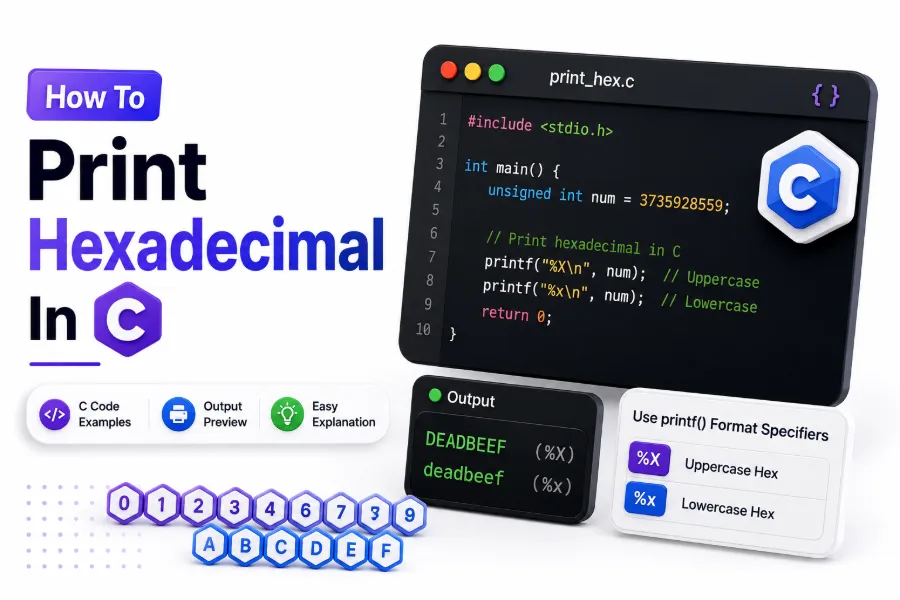
Printing numbers in hexadecimal is a common task in C programming, especially when working with memory addresses, binary data, bitwise operations, debugging, and low-level systems. Instead of displaying a number in the familiar decimal format, C can represent the same value using base 16 notation.
The standard printf() function makes hexadecimal output simple. You can use the %x or %X conversion specifier to tell C that a value should be displayed in hexadecimal. The lowercase %x produces letters from a through f, while uppercase %X produces A through F.
Once you know the correct format specifier, you can print hexadecimal values with very little code. C also provides options for adding a 0x prefix, controlling the number of digits, padding values with zeros, and printing different integer types. These features are useful when formatting technical output clearly.
Using printf to Print Hexadecimal
The simplest way to print a hexadecimal number in C is with the printf() function. The %x conversion specifier tells printf() to format an integer as hexadecimal rather than decimal.
For example, if an integer contains the decimal value 255, using %x displays it as ff. The underlying value has not changed. Only its printed representation is different, which makes hexadecimal useful when inspecting values at the byte and bit level.
Basic Hexadecimal Format Specifiers
C provides two common hexadecimal conversion specifiers:
%xprints hexadecimal letters in lowercase.%Xprints hexadecimal letters in uppercase.
For example, a value containing hexadecimal AB would appear as ab when printed with %x and AB when printed with %X.
The choice between uppercase and lowercase is mostly a formatting preference. Both represent the same numerical value.
Printing a Decimal Number as Hexadecimal
A decimal integer can be printed as hexadecimal without manually converting it first. The printf() function performs the conversion when you use the appropriate format specifier.
For example, the decimal value 42 is displayed as 2a with %x. If %X is used instead, the output becomes 2A. The number stored in the variable remains 42; only the output format changes.
Example With an Integer
A simple program can define an integer and print it in hexadecimal using %x. This is useful when you want to see how an ordinary integer appears in base 16.
The output will use hexadecimal notation, with values from 0 through 9 followed by the letters A through F. This approach is often used when checking numerical values during debugging or examining bitwise operations.
Lowercase and Uppercase Hexadecimal
The difference between %x and %X is the case of the hexadecimal letters. When a value contains digits that correspond to 10 through 15, %x displays them as lowercase letters, while %X displays them as uppercase letters.
For example, the hexadecimal representation of decimal 255 is ff using %x. The same value becomes FF using %X. Both formats are valid and describe exactly the same numerical value.
Choosing the Right Format
Use %x when you prefer lowercase hexadecimal output. Use %X when uppercase output is easier to read or matches the formatting used elsewhere in your application.
Consistency is usually more important than the choice itself. If hexadecimal values are being logged, printed in a diagnostic report, or displayed as structured data, using one style throughout the output makes the results easier to read.
Quick reference:
| Format | Output Style |
|---|---|
%x |
Lowercase hexadecimal |
%X |
Uppercase hexadecimal |
%#x |
Lowercase hexadecimal with 0x |
%#X |
Uppercase hexadecimal with 0X |
Printing Hexadecimal With the 0x Prefix
Sometimes you want the output to clearly identify itself as hexadecimal. C supports the # flag for this purpose. Using %#x adds a 0x prefix to a nonzero hexadecimal value.
For example, a value that normally prints as 2a can be displayed as 0x2a. With %#X, the output uses an uppercase prefix and uppercase hexadecimal letters.
Why the Prefix Is Useful
The prefix can make logs and debugging output easier to interpret. When several numerical formats appear together, a value such as 0x2A immediately signals that it is hexadecimal.
The prefix is especially common in programming documentation, debugging output, memory-related information, and bitwise operations. It is a notation convention rather than part of the numerical value itself.
Printing Hexadecimal With Leading Zeros
You can control the minimum width of hexadecimal output using a field width. Adding 0 before the width causes printf() to pad the output with zeros.
For example, %04X produces a hexadecimal value with at least four characters. A value that would normally appear as 2A can therefore be displayed as 002A.
Fixed-Width Hexadecimal Output
Fixed-width output is useful when displaying bytes, addresses, identifiers, or structured hexadecimal data. It keeps values aligned and makes patterns easier to compare.
For example, if several values are printed with four hexadecimal digits, values such as 000A, 002F, and 00FF have the same visual width. This can make debugging information considerably easier to scan.
Common formatting patterns:
%02X— at least two uppercase hexadecimal digits.%02x— at least two lowercase hexadecimal digits.%04X— at least four uppercase hexadecimal digits.%08X— at least eight uppercase hexadecimal digits.%#x— hexadecimal with a0xprefix.%#08x— prefixed hexadecimal with zero padding.
Printing Different Integer Types
The correct format specifier depends on the type of value you are printing. For an ordinary int, %x or %X is appropriate. For larger unsigned integer types, the corresponding length modifiers should be used.
Using a format specifier that does not match the argument type can produce incorrect results or undefined behavior. This is especially important in C because printf() relies on the programmer to provide a compatible format string.
Common Integer Formatting
For an unsigned int, %x or %X is appropriate. For an unsigned long, use %lx or %lX. For an unsigned long long, use %llx or %llX.
The uppercase and lowercase rules remain the same. The length modifier simply tells printf() how to interpret the supplied integer argument.
Printing Unsigned Values in Hexadecimal
Hexadecimal is often used with unsigned integers because the full bit pattern can be displayed without interpreting the highest bit as a sign bit. This is particularly useful when examining masks, flags, raw data, and binary operations.
For example, an unsigned 8-bit value can range from 0 through 255, corresponding to 00 through FF in hexadecimal. The exact C type used for an 8-bit value can vary by implementation, so fixed-width types are often preferable when exact sizes matter.
Why Unsigned Values Matter
Signed and unsigned integers can represent the same underlying bit patterns differently. If your goal is to inspect raw bits, an unsigned type often makes the intended representation clearer.
The hexadecimal format itself does not change the bits. It simply displays the numerical value according to base 16 notation.
Printing a Single Byte as Hexadecimal
When working with bytes, two hexadecimal digits are commonly used because one byte contains eight bits. A width of two with zero padding ensures that values below 16 are displayed consistently.
For example, a byte containing decimal 5 can be displayed as 05 instead of simply 5. Similarly, decimal 15 becomes 0F, while decimal 255 becomes FF.
Why Two Digits Matter
Without padding, a sequence of byte values might look inconsistent. Values such as 5, A, and FF have different lengths even though each represents one byte.
Using a two-digit format creates a predictable representation: every byte occupies exactly two hexadecimal characters. This is common in hex dumps, binary file tools, packet analysis, and debugging utilities.
Printing Hexadecimal Memory Addresses
Memory addresses are another common reason to print hexadecimal in C. Pointer values should be printed using %p, rather than treating them as ordinary integers with %x.
The %p conversion specifier is designed specifically for pointers. The exact representation is implementation-defined, but it commonly appears in hexadecimal form with a 0x-style prefix.
Hexadecimal and Pointers
If you need to display the address stored in a pointer, pass the pointer to printf() using %p and cast it to void * as required by the printf() interface.
This is different from printing the numerical value of an integer. A pointer represents an address, so using the dedicated pointer conversion specifier is the safer and more portable approach.
Printing Hexadecimal in a Loop
A loop can be used to print a sequence of hexadecimal values. This is useful when examining arrays, buffers, byte streams, or generated numerical data.
Each iteration can format the current value with %02X, %04X, or another appropriate width. Adding spaces or line breaks can turn the output into a simple, readable hexadecimal dump.
Formatting Hexadecimal Data
When printing many values, consistent formatting becomes important. Two-digit formatting works well for bytes, while larger widths can be useful for words or addresses.
You can also place a fixed number of values on each line. This creates output that resembles the hexadecimal views found in debugging and file-analysis tools.
Printing Hexadecimal With printf Width and Precision
The field width in printf() controls the minimum number of characters used for the output. If the value needs fewer characters, additional spaces are normally added. When a zero flag is used, zeros can be placed before the hexadecimal digits.
Precision can also be used with integer conversions, although width and zero-padding are generally more straightforward for common hexadecimal formatting tasks.
Width Versus Zero Padding
A format such as %8X creates a minimum width of eight characters and normally uses spaces for padding. A format such as %08X uses zeros instead.
For technical output, zero padding is often useful because it preserves a fixed hexadecimal representation. The choice depends on whether you want aligned columns or fixed-width numerical values.
Printing Hexadecimal Values in C Safely
Correct format specifiers are important when using printf(). The conversion specifier must correspond to the type of the argument. Problems can occur when a programmer assumes that all integer types can be printed with %x.
For portable code, pay attention to integer widths and use the appropriate format modifiers. When exact-width integers are required, the <stdint.h> types and corresponding format macros from <inttypes.h> can provide a more portable approach.
Avoiding Common Formatting Errors
A common mistake is using %x with a value whose type requires a different length modifier. Another is attempting to print a pointer with %x instead of %p.
It is also important to remember that %x formats an integer as hexadecimal; it does not convert or modify the stored value. The formatting happens only when the value is passed to the output function.
Best practices:
- Use
%xfor lowercase hexadecimal. - Use
%Xfor uppercase hexadecimal. - Use
%#xwhen a0xprefix is useful. - Use
%02Xfor two-digit byte output. - Use
%pfor pointer addresses. - Match length modifiers to the integer type.
- Use fixed-width integer types when exact sizes matter.
Common Uses of Hexadecimal Output in C
Hexadecimal output is particularly useful in systems programming and debugging. It allows developers to inspect values at a level that is closer to their binary representation without requiring long strings of zeros and ones.
You may see hexadecimal output when examining bit masks, hardware registers, memory buffers, file contents, network packets, or encoded data. It is also useful when comparing values where individual bits matter.
Practical Examples of Hexadecimal Output
Common applications include:
- Debugging bitwise operations.
- Printing byte arrays.
- Inspecting binary data.
- Displaying hardware register values.
- Formatting identifiers.
- Examining memory-related information.
- Creating simple hex dumps.
- Checking encoded values.
For anyone working with low-level C code, hexadecimal output is a practical way to inspect what the program is actually handling.
Hexadecimal Output and Binary Data
Hexadecimal provides a convenient bridge between human-readable output and binary data. One hexadecimal digit represents four bits, so two hexadecimal digits represent a complete byte.
This makes hexadecimal particularly useful when printing raw buffers. Instead of showing eight binary digits for every byte, you can show two hexadecimal characters. The result is shorter while preserving the complete byte value.
Reading a Hexadecimal Byte
Suppose a buffer contains the byte represented by binary 10101100. Split it into two groups of four bits: 1010 and 1100. These correspond to A and C, giving the hexadecimal value AC.
When a C program prints that byte using an appropriate hexadecimal format, the output can therefore appear as AC. This makes the bit pattern easier to recognize without converting the entire value to decimal.
Conclusion
Printing hexadecimal in C is straightforward once you know the appropriate printf() conversion specifiers. %x produces lowercase hexadecimal, while %X produces uppercase output. Additional formatting options allow you to add prefixes, pad values with zeros, and create fixed-width output for bytes and larger values.
Hexadecimal output is particularly valuable when working with binary data, bitwise operations, memory-related information, debugging, and low-level programming. The representation is compact because each hexadecimal digit corresponds to four binary bits, making byte-level information much easier to read.
For ordinary integers, %x and %X cover most basic needs. When working with pointers, use %p, and when dealing with different integer types, make sure the format specifier matches the argument type. With these rules in place, printing hexadecimal values becomes a reliable and useful part of C programming.
Frequently Asked Questions
What format specifier prints hexadecimal in C?
The %x format specifier prints an integer in lowercase hexadecimal, while %X prints uppercase hexadecimal. Both are commonly used with printf() for hexadecimal integer output.
How do I print uppercase hexadecimal in C?
Use %X with printf(). Values containing hexadecimal letters from A through F will be displayed in uppercase instead of lowercase.
How do I print hexadecimal with 0x in C?
Use the # flag with the hexadecimal conversion specifier. %#x commonly produces output with a 0x prefix, while %#X uses uppercase hexadecimal formatting.
How do I print a byte as two hexadecimal digits?
Use a two-character field with zero padding, such as %02X. This displays values from 00 through FF using exactly two hexadecimal characters.
Should I use %x to print a pointer?
No. Pointers should generally be printed with %p, using the pointer formatting expected by the C standard library. %x is intended for integer values, not pointer addresses.
0 Comments