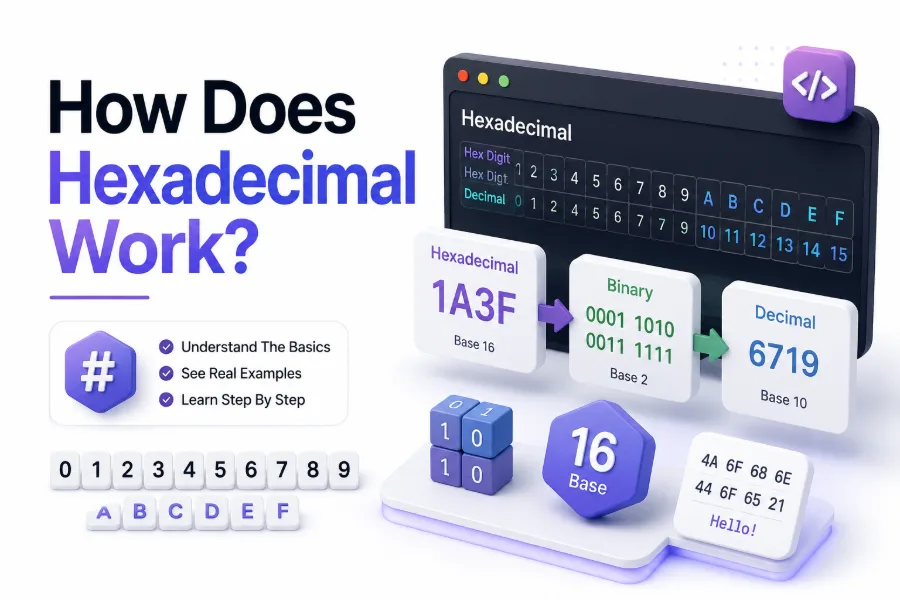
Computers store information using binary, a number system based on only 0 and 1. Humans, however, often find long strings of binary difficult to read. Hexadecimal provides a shorter way to represent the same information by using 16 symbols, making technical data easier to read, write, and organize.
If you have seen values such as FF, 2A, 7B, or 0x1F, you have encountered hexadecimal. It appears in programming, computer memory, HTML colors, network addresses, file formats, and debugging tools. The system may look unfamiliar at first, but its rules are straightforward once you understand place values and how they relate to binary.
This article explains how hexadecimal works, why computers use it, how hexadecimal converts to decimal and binary, and where you are likely to encounter it in practical computing.
What Hexadecimal Means
Hexadecimal is a positional number system with a base of 16. Unlike decimal, which uses ten symbols from 0 through 9, hexadecimal needs sixteen symbols. The first ten are 0–9, while the remaining six are represented by the letters A, B, C, D, E, and F.
Each hexadecimal digit represents a value from zero through fifteen. The letter A represents 10, B represents 11, C represents 12, D represents 13, E represents 14, and F represents 15. After F, the next value is written as 10 in hexadecimal, just as decimal moves from 9 to 10.
The Hexadecimal Digit Set
The complete hexadecimal digit set is simple:
- 0 = zero
- 1 = one
- 2 = two
- 3 = three
- 4 = four
- 5 = five
- 6 = six
- 7 = seven
- 8 = eight
- 9 = nine
- A = ten
- B = eleven
- C = twelve
- D = thirteen
- E = fourteen
- F = fifteen
The letter values are not separate numbers from the digits. They simply provide symbols for values that cannot be represented by a single decimal digit. Hexadecimal notation may use uppercase or lowercase letters, depending on the programming language or application.
How Hexadecimal Place Values Work
Hexadecimal uses place values in the same basic way as decimal. The important difference is that each position represents a power of 16 rather than a power of 10. Starting from the right, positions represent 16⁰, 16¹, 16², 16³, and so on.
For example, the hexadecimal number 2A contains two positions. The A is in the 16⁰ position, so its value is 10. The 2 is in the 16¹ position, giving 2 × 16. Adding these values produces 42 in decimal.
A Simple Place-Value Example
Consider the hexadecimal number 3F. The rightmost F represents 15, while the 3 represents three groups of 16. Therefore, the calculation is 3 × 16 + 15, which equals 63 in decimal.
A longer value follows exactly the same rule. For 1A4, the positions represent 16², 16¹, and 16⁰. The calculation becomes 1 × 256 + 10 × 16 + 4. The result is 420 in decimal.
Key hexadecimal facts:
- Hexadecimal uses base 16.
- There are 16 possible values per digit.
- A hexadecimal digit represents four binary bits.
- A pair of hexadecimal digits represents one byte.
- A hexadecimal number can represent the same value as binary or decimal.
AthroughFrepresent values 10 through 15.
Hexadecimal and Binary
Hexadecimal has a particularly useful relationship with binary because 16 equals 2⁴. This means every single hexadecimal digit corresponds exactly to four binary digits, also called bits. That direct relationship is one of the main reasons hexadecimal is popular in computing.
For example, hexadecimal A represents decimal 10. In binary, 10 is 1010. Similarly, hexadecimal F represents 15, which is 1111 in binary. Because the conversion happens in groups of four bits, programmers can translate between hexadecimal and binary without complicated calculations.
Converting Hexadecimal to Binary
To convert hexadecimal to binary, replace every hexadecimal digit with its four-bit binary equivalent. For example, 2F becomes 0010 1111. The hexadecimal 2 maps to 0010, while F maps to 1111.
Leading zeros are important when showing the full four-bit representation. They may be omitted when writing an ordinary binary number, but keeping them makes the relationship between hexadecimal digits and binary groups much clearer.
Why Computers Use Hexadecimal
Computers do not normally process data internally as hexadecimal. Electronic systems fundamentally work with binary states, represented conceptually as zeros and ones. Hexadecimal is mainly a human-friendly notation that provides a compact way to view binary information without writing long strings of bits.
A single hexadecimal digit replaces four binary digits. Eight binary bits can therefore be represented by only two hexadecimal digits. This makes memory values, machine instructions, byte sequences, and other low-level data much easier for programmers and technicians to inspect.
Hexadecimal Saves Space on the Page
Suppose a computer value contains 32 bits. Writing it in binary requires 32 individual digits. The same value requires only eight hexadecimal digits because every hex digit represents four bits.
This does not mean hexadecimal makes the computer store less information. The underlying data remains the same. Hexadecimal simply changes how humans write and read that information, much like writing a large quantity in a shorter mathematical notation.
Hexadecimal is useful because it:
- Represents binary data compactly.
- Makes individual bytes easier to recognize.
- Simplifies memory and debugging work.
- Helps programmers inspect low-level values.
- Works naturally with groups of four and eight bits.
- Is easier to scan than long binary strings.
How Hexadecimal Relates to Bytes
A byte contains eight bits, and two hexadecimal digits can represent all 256 possible byte values. Each hexadecimal digit represents four bits, so two digits together represent eight bits. This creates a convenient connection between hexadecimal notation and common computer storage units.
For example, the hexadecimal value FF represents the largest value that can fit into an unsigned eight-bit byte. Its decimal value is 255, and its binary representation is 11111111. Similarly, 00 represents zero.
Reading Byte Values in Hex
Hexadecimal is commonly used to display raw bytes because two digits provide a consistent representation for every possible byte. Values from 00 through FF cover the entire unsigned byte range from 0 through 255.
This consistency is useful when inspecting files or memory. A sequence such as 4A 6F 79 21 can be viewed as four separate bytes. Each pair gives a clear boundary, making patterns easier to identify than an uninterrupted binary sequence.
Hexadecimal in Programming
Programmers frequently use hexadecimal when working close to computer hardware or dealing with values that map naturally to bytes. Many programming languages support hexadecimal integer literals, allowing developers to write a value directly in base 16 rather than converting it mentally or writing its decimal equivalent.
A common notation is the 0x prefix. For example, 0x2A means the hexadecimal value 2A. The prefix tells the reader and programming language that the number is written in hexadecimal rather than decimal.
Hexadecimal Constants and Values
Hexadecimal values can be useful for bit masks, flags, memory-related operations, binary protocols, and color values. A programmer may choose hexadecimal because the representation makes the structure of the underlying bits easier to see.
For example, a value such as 0xFF immediately suggests eight set bits because each F represents four 1s in binary. The same value written as decimal 255 does not provide the same visual connection to the bit pattern.
Hexadecimal in Memory Addresses
Computer memory is commonly represented using hexadecimal addresses because memory addresses can become long when written in decimal or binary. Hexadecimal offers a compact notation while preserving a useful relationship with the underlying binary representation.
When debugging software, developers may encounter addresses such as 0x7FF.... These values identify locations or ranges in memory. The exact address format depends on the operating system, processor architecture, and application, but hexadecimal remains a convenient notation.
Why Memory Values Look Like Hex
Memory is ultimately organized using binary values, but hexadecimal makes those values easier to inspect. Since each hex digit corresponds to four bits, changes in individual portions of an address are easier to recognize.
Hexadecimal is especially useful when working with pointers, memory dumps, machine-level debugging, and embedded systems. Developers do not need to convert every address to decimal to compare values or identify patterns.
Important facts about memory and hex:
- Memory addresses are numerical values.
- Hexadecimal provides a compact way to display them.
- The
0xprefix commonly identifies hexadecimal notation. - Address size depends on the computer architecture.
- Hexadecimal does not change the actual memory location.
- Debuggers often display addresses and values in hexadecimal.
Hexadecimal Color Codes
One of the most familiar uses of hexadecimal outside programming is web color notation. A typical HTML or CSS color code looks like #336699. The six hexadecimal digits represent three color channels: red, green, and blue.
Each color channel uses two hexadecimal digits, allowing values from 00 to FF. Because each pair represents a value from 0 to 255, the format provides 256 possible intensity levels for red, green, and blue.
Reading a Hex Color
In a six-digit color code, the first two digits represent red, the next two represent green, and the final two represent blue. For example, #FF0000 contains maximum red and zero green and blue, producing pure red.
A value such as #000000 represents black because all three channels are zero. #FFFFFF represents white because all three channels are at their maximum value of 255. This makes hexadecimal particularly convenient for digital color systems.
Hexadecimal Conversion to Decimal
Converting hexadecimal to decimal requires multiplying each digit by its corresponding power of 16 and then adding the results. The method works for numbers of any length, although longer values require more place-value calculations.
For example, hexadecimal 2B can be converted by taking 2 × 16 and adding the decimal value of B, which is 11. The result is 43. This same process works for larger numbers such as 1F4.
A Practical Conversion Method
To convert 1F4 to decimal, identify the place values first. The 1 is multiplied by 16², F is multiplied by 16¹, and 4 is multiplied by 16⁰. The calculation is 1 × 256 + 15 × 16 + 4, giving 500.
This approach may feel slower than reading a decimal number, but it follows a predictable rule. Hexadecimal calculators and conversion tools can handle the arithmetic automatically, while programmers often become comfortable performing short conversions mentally.
Decimal to Hexadecimal Conversion
Converting decimal to hexadecimal usually involves repeated division by 16. Divide the decimal number by 16, record the remainder, and continue dividing the quotient until it reaches zero. Reading the remainders from bottom to top gives the hexadecimal result.
For example, converting decimal 42 begins with 42 divided by 16. The quotient is 2 and the remainder is 10. Since decimal 10 is represented by hexadecimal A, the result becomes 2A.
Why Remainders Matter
The remainder from each division represents one hexadecimal digit. A remainder between 0 and 9 uses the matching number, while a remainder from 10 to 15 becomes A through F.
This method is reliable for manual conversion, particularly when working with small values. For larger values, software tools can perform the calculation instantly, but knowing the process helps you verify results and understand what conversion tools are doing.
Hexadecimal Compared With Decimal and Binary
Hexadecimal, decimal, and binary can all represent the same numerical values. Their main difference is the number of symbols available and the base used for place values. Decimal is base 10, binary is base 2, and hexadecimal is base 16.
Decimal is the standard system people use in everyday life. Binary is fundamental to digital computing, while hexadecimal provides a compact notation for values that are naturally represented by groups of binary bits.
Quick Number System Comparison
| Number System | Base | Symbols Used | Common Use |
|---|---|---|---|
| Binary | 2 | 0–1 | Computer-level data |
| Decimal | 10 | 0–9 | Everyday calculations |
| Hexadecimal | 16 | 0–9, A–F | Programming and technical data |
The choice of number system does not change the underlying quantity. For instance, decimal 15, binary 1111, and hexadecimal F all describe exactly the same value.
Common Places You See Hexadecimal
Hexadecimal appears in more places than many people realize. Web developers encounter it in color codes, programmers use it for constants and bit operations, and system administrators may see it in memory addresses or diagnostic output.
File analysis and debugging tools also rely heavily on hexadecimal. When a binary file is opened in a hex editor, the contents are often displayed as rows of hexadecimal byte values alongside an interpreted text column.
Practical Uses of Hexadecimal
Common applications include:
- HTML and CSS color values.
- Memory addresses.
- Debugging information.
- Hex editors.
- Binary file inspection.
- Network packet analysis.
- Bit masks and flags.
- Embedded programming.
- Machine-level programming.
- Character and byte representations.
If you regularly work with files or low-level data, learning [hex editor basics](Internal Link: Hex Editor Basics) can make hexadecimal values much easier to interpret.
Hexadecimal and Character Encoding
Hexadecimal is also useful when examining character encoding because text is ultimately stored as numerical data. A character may have a specific byte or sequence of bytes associated with it, and hexadecimal provides a convenient way to display those bytes.
For example, the ASCII character A has the hexadecimal value 41. The character B is 42, and C is 43. Looking at these values in a hex editor can reveal recognizable patterns within text-based files.
Hex Values in Text Files
When a file contains ordinary ASCII text, the hexadecimal representation can often be matched directly to characters. This is useful when diagnosing corrupted files, inspecting file headers, or checking whether a file contains expected data.
Modern text formats can use encodings such as UTF-8, where characters may occupy multiple bytes. Even then, hexadecimal remains useful because it shows the actual byte sequences stored in the file.
How to Read Hexadecimal More Easily
The easiest way to become comfortable with hexadecimal is to memorize the values A through F and practice the relationship between one hex digit and four binary bits. Once those patterns become familiar, many common values can be recognized without lengthy calculations.
It also helps to group hexadecimal values into pairs when working with bytes. A sequence such as 0A 3F FF 80 becomes easier to interpret when each two-digit group is treated as one byte.
A Simple Practice Routine
Start with small conversions such as decimal 10 to hexadecimal A and decimal 15 to hexadecimal F. Then practice values such as 16, 31, 32, 64, 128, and 255.
Next, connect each hexadecimal digit to binary. Knowing that F equals 1111 and A equals 1010 makes larger hexadecimal values much easier to interpret because each digit can be translated independently.
Common Mistakes With Hexadecimal
One common mistake is treating hexadecimal letters as if they represent ordinary alphabetic characters. In a numerical context, A through F have specific values from 10 through 15. Another mistake is forgetting that place values increase by powers of 16.
People also sometimes assume that hexadecimal is a different type of computer data. It is not. Hexadecimal is a notation system used to represent numerical values. The computer can store the same value in binary regardless of whether a programmer chooses to display it as hexadecimal or decimal.
Avoiding Conversion Errors
When converting hexadecimal, write the place values clearly before calculating. For a two-digit number, the positions are 16¹ and 16⁰. For three digits, they become 16², 16¹, and 16⁰.
For binary conversion, remember that every hexadecimal digit always maps to four bits. This rule prevents many common mistakes and makes the conversion process almost mechanical.
Quick tips for beginners:
- Memorize A = 10 through F = 15.
- Remember that hexadecimal uses powers of 16.
- Treat two hex digits as one byte.
- Associate every hex digit with four binary bits.
- Use
0xas a common clue for hexadecimal integers. - Practice both decimal-to-hex and hex-to-decimal conversions.
- Group long hexadecimal strings into readable sections.
Why Hexadecimal Remains Important
Hexadecimal remains valuable because it provides a practical middle ground between binary and decimal. Binary shows the underlying bit structure clearly but becomes difficult to read as values grow. Decimal is familiar but does not map neatly onto groups of bits.
Hexadecimal solves much of this readability problem. Its base aligns perfectly with four-bit groups, making bytes and larger binary values easier to represent. This relationship keeps hexadecimal useful across programming, debugging, networking, electronics, and file analysis.
Hexadecimal as a Human-Friendly Notation
The biggest advantage of hexadecimal is readability. A developer looking at FF 00 A7 1C can quickly identify four bytes. The equivalent binary string would contain 32 digits and would be much harder to scan accurately.
Hexadecimal also makes patterns visible. Repeated values, byte boundaries, and bit-level changes are easier to recognize. That is why technical software frequently offers hexadecimal views even when the underlying system works entirely with binary.
Conclusion
Hexadecimal is a base-16 number system that uses the digits 0 through 9 and the letters A through F. Its main strength comes from its direct relationship with binary: every hexadecimal digit represents exactly four bits, while two hexadecimal digits represent one byte.
That relationship explains why hexadecimal appears throughout programming and computer technology. It provides a compact way to display memory addresses, byte values, binary files, color codes, character data, and other technical information. Once the place-value system becomes familiar, conversions between hexadecimal, decimal, and binary become much easier.
The key to knowing how does hexadecimal work is recognizing that it is not a separate form of computer storage. It is a convenient way for people to represent numerical data. Learning the values A through F, understanding powers of 16, and connecting each hex digit to four binary bits gives you the foundation needed to read hexadecimal confidently.
Frequently Asked Questions
Is hexadecimal easier than binary?
For most people working with computer data, hexadecimal is easier to read than binary. Each hex digit represents four bits, so long binary sequences become much shorter without losing any numerical information.
Why does hexadecimal use letters?
Hexadecimal needs sixteen symbols, but decimal digits provide only ten. The letters A through F supply the remaining six symbols, representing values 10 through 15.
What does 0x mean in hexadecimal?
0x is a common prefix used in programming to indicate that the following number is hexadecimal. For example, 0xFF tells the reader and programming language that FF should be interpreted using base 16.
How many bits are in one hexadecimal digit?
One hexadecimal digit represents four bits because hexadecimal has 16 possible values and 2⁴ equals 16. Therefore, every value from 0 through F can be represented by exactly four binary digits.
Where is hexadecimal commonly used?
Hexadecimal is commonly used for programming values, memory addresses, byte sequences, HTML and CSS colors, debugging, binary file inspection, network data, embedded systems, and low-level computer operations.
0 Comments